A Google Ads terms and conditions suspension stops all advertising on your account and will not resolve on its own. But in the vast majority of cases, the root cause is identifiable and the suspension is reversible.
The catch: most advertisers start the recovery process in the wrong place. They appeal the Google Ads suspension directly, which almost always gets denied because the actual problem is somewhere else.
At StubGroup, we are a Google Premier Partner and we specialize in suspension recovery. In our experience, 95% of T&C suspensions trace back to a single cause, and the fix requires a specific sequence of steps.
What a Terms and Conditions Suspension Actually Means
A terms and conditions (T&C) suspension is a full account-level action. It is not the same as a disapproved ad or a policy warning on a specific campaign. When Google applies a T&C suspension:
- All ads stop running immediately.
- You cannot create new campaigns, ad groups, or ads.
- Historical data and reports remain accessible.
- Linked accounts, including Google Merchant Center, may also be affected.
The suspension is considered permanent unless you successfully appeal it. According to Google’s official suspension overview, advertisers have at least six months from the suspension date to submit an appeal, but acting quickly matters. The longer you wait, the harder it is to reconstruct what triggered it.
T&C suspensions fall under the “policy violations” category in Google’s enforcement hierarchy, which means they are typically fixable through the appeal process. This separates them from egregious violations (circumventing systems, counterfeit goods, malicious software), which are usually permanent. For context on the scale of enforcement, Google’s 2024 Ads Safety Report showed 5.5 billion ads removed and over 12.7 million advertiser accounts suspended that year.

Google’s Strike System: How Enforcement Escalates
Google does not jump straight to a full suspension for every violation. The enforcement model starts with a warning (at least 7 days before any action), then uses a three-strike system that escalates with each offense:
- First strike: A 3-day hold on your account. Ads stop running, but the hold lifts automatically after three days once the violation is addressed.
- Second strike: A 7-day hold. Same concept, longer freeze.
- Third strike: Full account suspension. This is the permanent action that requires an appeal to reverse.
Each policy area allows a maximum of three strikes, and strikes reset after 90 days of compliance. A first strike for misrepresentation and a first strike for misleading content are tracked separately.
The practical takeaway: if you receive a first or second strike, treat it as an urgent warning. Fix the underlying issue immediately. Do not wait for the hold to expire and assume everything is fine. The third strike removes your ability to advertise, and the appeal process is slower and less certain than simply resolving the issue during the hold period.
The #1 Cause: A Suspended Google Merchant Center Account
At least 95% of the time, a T&C suspension is caused by one thing: a Google Merchant Center account that is linked to the Ads account and has been suspended, usually for misrepresentation.
Here is what happens. Google detects that your Merchant Center account has a policy violation. That Merchant Center suspension then cascades to the linked Google Ads account, triggering the T&C suspension on the Ads side. The T&C violation is a downstream consequence of the Merchant Center problem, not a separate issue.
This linkage is sticky. Even if you have already disconnected the Merchant Center account from your Ads account, Google’s systems retain a record of that historical connection. We have seen multiple cases where an advertiser unlinked the accounts months ago, but the Ads suspension persisted because Google still associates them internally. Disconnecting alone does not clear the flag.
If you see a T&C suspension and you have (or ever had) a Merchant Center account, check the Merchant Center status first. If it shows a suspension for misrepresentation or any other policy issue, that is almost certainly the root cause.
Our Merchant Center misrepresentation fix guide walks through the full resolution process.
Other Causes (The Remaining 5%)
Not every T&C suspension traces back to Merchant Center. In a small percentage of cases, the suspension is triggered by:
Billing and payment issues. Unpaid balances, chargebacks, or payment methods flagged for suspicious activity. Google may suspend the entire account rather than just pausing billing. Billing-related warnings typically come with a window to resolve the issue before escalation, so act quickly if you receive one.
Unauthorized account activity. If Google detects logins from unusual locations, bulk changes that look automated, or access patterns consistent with account compromise, a T&C suspension can follow.
Policy violations not tied to Merchant Center. Running ads for restricted products, making claims that violate advertising standards, or landing page content that conflicts with Google’s Ads Terms & Conditions.
These edge cases follow a different diagnostic path than the Merchant Center scenario, but the appeal process is the same: identify the specific violation, fix it, then submit the appeal. Do not guess. Read the suspension notice carefully, and if it is not clear, work through the diagnostic checklist in our Google Ads suspension guide.
The Correct Fix Order (Most People Get This Wrong)
The biggest mistake advertisers make is appealing the Google Ads suspension first. This almost always fails because the root cause has not been addressed. Google’s systems see that the Merchant Center is still suspended and deny the appeal.
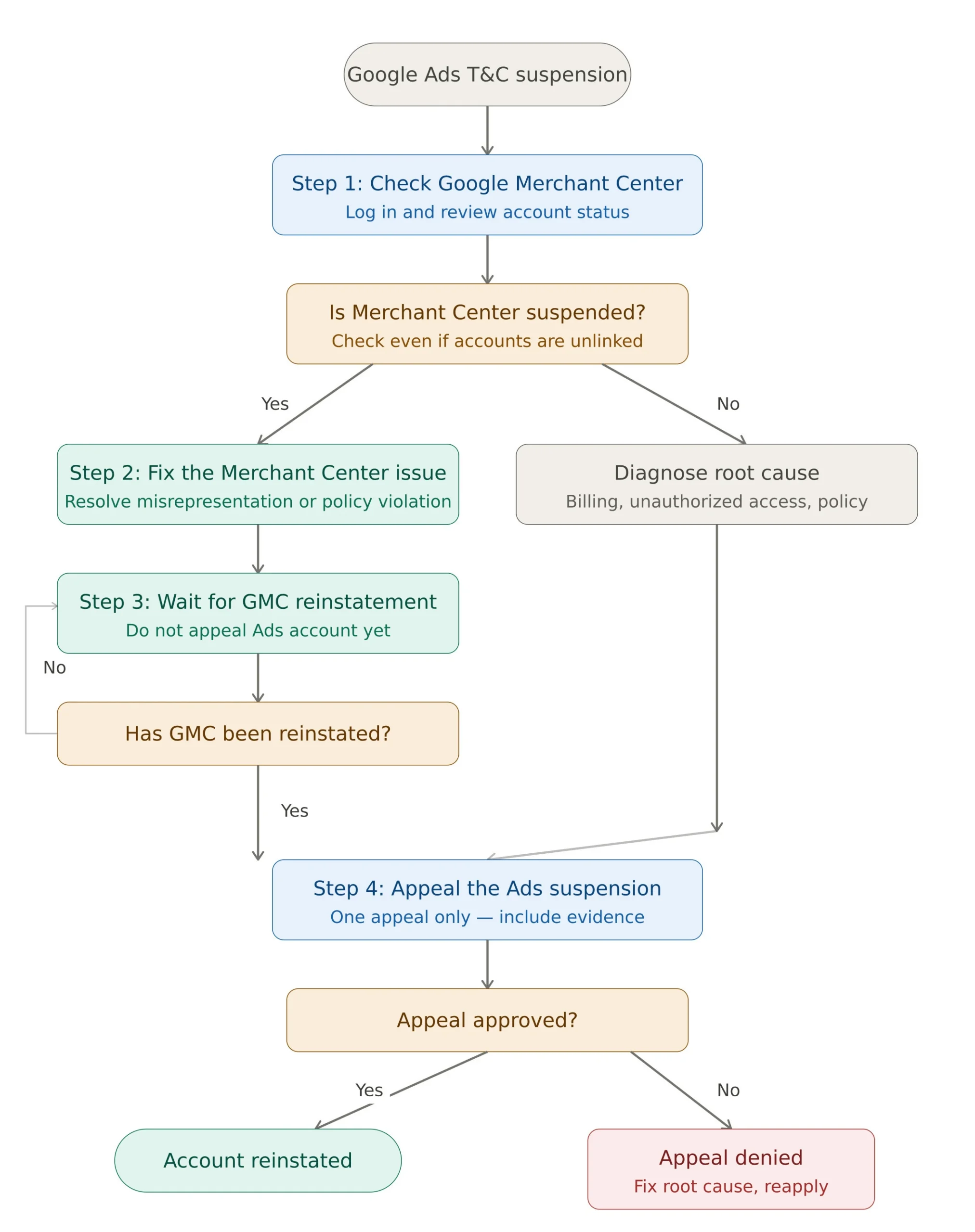
Here is the correct sequence:
Step 1: Check your Google Merchant Center account. Log in and check its status. If it shows a suspension notice, that is your starting point. Read the reason carefully because it tells you exactly which policy was violated.
Step 2: Fix the Merchant Center suspension. Before you can reinstate the Ads account, the Merchant Center issue must be resolved. This typically involves identifying the specific violation (misrepresentation is the most common), making the required changes to your website and product listings, and then requesting a review. Our Merchant Center suspension guide covers the full process.
Step 3: Wait for Merchant Center reinstatement. Do not move to Step 4 until your Merchant Center account has been reviewed and reinstated. Submitting the Ads appeal while the Merchant Center is still suspended will result in a denial.
Step 4: Appeal the Google Ads account suspension. Once Merchant Center is clean, submit the Ads appeal. Be specific about what was wrong, what you changed, and the fact that the linked Merchant Center account has been reinstated. Use the Google Ads appeal form and include clear evidence.
If your suspension is not Merchant Center-related (the 5% of cases), skip Steps 1-3 and go directly to diagnosing the root cause from the suspension notice. The appeal process in Step 4 still applies.
How to Write an Appeal That Actually Works
A weak appeal wastes your best shot at reinstatement. Here is what separates appeals that succeed from ones that get denied.
Acknowledge the specific policy area. Do not write a vague “I don’t know what happened” appeal. Even if you disagree with the suspension, demonstrate that you understand which policy was violated and why Google flagged it.
Show what you audited. List the specific areas you reviewed: website content, product listings, landing pages, billing information, Merchant Center status, and account access logs. Google wants to see that you took the process seriously.
Detail the corrective actions. Do not just say “I fixed the problem.” Specify what changed. Updated policy pages, corrected product descriptions, removed misleading claims, verified business information. Screenshots help.
Complete advertiser verification first. Google uses this to confirm your identity and business legitimacy. If you have not completed it, do it before submitting the appeal. An unverified advertiser submitting an appeal is a red flag. Note: you get a maximum of 3 verification attempts. If all three fail, you are barred from the appeal process entirely, so make sure your documentation is accurate before each submission.
What not to do:
Do not submit multiple appeals in quick succession. Google’s system imposes a seven-day hold on appeal processing if too many are filed. One well-crafted appeal is better than five rushed ones.
Do not create a new Google Ads account to get around the suspension. Google detects this through device fingerprinting, payment methods, and IP addresses. A new account for a suspended business may get flagged for circumventing systems, which is an egregious violation and much harder to reverse.
Do not mention lost revenue or emotional impact in the appeal. Google’s review teams evaluate policy compliance, not business hardship.
What Happens After You Appeal
After submission, you wait for a response via email. In November 2025, Google announced improvements to its suspension resolution process, stating that 99% of suspensions are now resolved within 24 hours and incorrect suspensions have been reduced by over 80%. Google also reported a 70% improvement in overall resolution times.
However, the reality on the ground does not always match these numbers. Advertisers in forums and community threads regularly report wait times of 30 days or more, with some cases dragging on for months. The gap between Google’s published benchmarks and actual advertiser experience is significant, particularly for accounts with layered issues (Merchant Center plus Ads suspensions, or multiple policy violations).
Two possible outcomes:
Appeal approved. Your account is reinstated and campaigns can resume. Be careful going forward. A second violation of the same policy can result in a permanent suspension with no further appeal option.
Appeal denied. You may submit another appeal after making additional corrections, but there is no guaranteed limit on how many times you can try. If repeated appeals are denied without changes, Google may stop reviewing them.
If your account was suspended for an egregious violation and the appeal is permanently denied, Google may ban you from advertising entirely.
Where T&C Suspensions Fit Among Other Suspension Types
Google categorizes account suspensions into several tiers. Understanding where T&C falls helps you gauge severity and the path to account reinstatement.
Policy violations (including T&C). These result from violations of Google Ads policies or Terms and Conditions. They are the most common suspension type and typically allow for an appeal and reinstatement if the underlying issue is resolved.
Egregious violations. These include circumventing systems, unacceptable business practices, counterfeit goods, and malicious software. They are considered unlawful or severely harmful and are usually permanent. The appeal process exists but the success rate is significantly lower.
Billing and payment suspensions. Triggered by unpaid balances, suspicious payment activity, or promotional code abuse. These are often resolved by settling the outstanding balance or verifying payment information. Google typically gives 30 days to resolve billing issues before escalating to a full suspension.
A T&C suspension is serious, but it sits in the fixable tier. The key is diagnosing the root cause correctly before spending your appeal.
When to Get Expert Help
Navigating a T&C suspension on your own is possible if the root cause is straightforward. But if you are dealing with a layered situation (a Merchant Center misrepresentation suspension tied to website content issues, plus a historically linked Ads account), the diagnostic path gets complex fast.
StubGroup is a Google Premier Partner and we specialize in suspension recovery. We have built our practice around understanding how Google’s enforcement systems work, what triggers cascading suspensions, and how to write appeals that get approved.
If you want to work through it yourself, start with our free resources:
- Google Ads Suspension Guide – covers all suspension types
- Google Merchant Center Suspension Fix – step-by-step for the #1 cause of T&C suspensions
- How to Submit a Google Ads Appeal – appeal timeline and best practices
If you want our team to handle it: Hire StubGroup to fix your suspension.
Get our Free Guide to Fixing Google Suspensions
Discover the StubGroup Google Policy Center. Your hub for fixing suspensions, staying compliant, and keeping ads running smoothly.
Sign Me Up!
Frequently Asked Questions
How long does a Google Ads suspension last?
A T&C suspension is considered permanent unless you successfully appeal it. You have at least six months from the suspension date to submit an appeal. Google has stated that 99% of suspensions are now resolved within 24 hours of appeal submission, though real-world reports from advertisers suggest wait times can stretch to 30 days or longer.
Can I create a new account while my old one is suspended?
No. Google will detect the connection through payment methods, device IDs, IP addresses, and other signals. The new account may be suspended for circumventing systems, which is an egregious violation and far harder to reverse than the original T&C suspension.
My Ads account is not currently linked to Merchant Center. Can a T&C suspension still be MC-related?
Yes. Google retains a history of account linkages. If your Ads account was ever linked to a Merchant Center account that has since been suspended, even if you unlinked them, the T&C suspension can still stem from that historical connection. Check your Merchant Center account status regardless.
What if my appeal is denied?
You can submit another appeal after making additional corrections. Do not resubmit the same appeal without changes. If your appeal is denied, the denial email sometimes includes guidance on what to address. If it does not, review the suspension reason again and check whether any connected accounts (Merchant Center, YouTube, etc.) have unresolved policy issues.
Can related or linked accounts be affected?
Yes. A suspension on one account can cascade to linked accounts. This is most commonly seen with the Google Merchant Center-to-Ads linkage, but it can also affect accounts sharing the same billing profile.
How does the strike system work?
Google uses a three-strike system per policy area. The first strike results in a 3-day account hold. The second strike triggers a 7-day hold. The third strike results in a full account suspension that requires a formal appeal. Strikes for different policy areas are tracked independently. Google does not use a strike system for all types of suspensions.